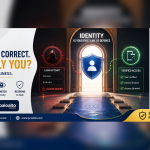
Being Inside the Company Network Should Not Automatically Mean Being Trusted
Traditional security was often designed around a network perimeter.
Employees worked from company offices. Applications ran on internal servers. Business information remained inside the organisation. Firewalls separated the trusted internal network from the untrusted internet.
That model has changed.
Today, an employee may access business systems from:
- A company laptop
- A mobile device
- Home
- A branch office
- A customer site
- A hotel
- Another country
- A cloud application
At the same time, organisations may depend on Microsoft 365, cloud platforms, third-party applications, contractors and external technology providers.
A user being “inside” the network is therefore no longer sufficient proof that access should be trusted.
NIST’s Zero Trust Architecture states that trust should not automatically be granted based on physical or network location or because a device belongs to the organisation.
This is where Zero Trust becomes important.
What Is Zero Trust?
Zero Trust is a cybersecurity strategy based on continuously validating access rather than assuming that users, devices or connections are safe.
Microsoft summarises Zero Trust through three principles:
Verify explicitly
Use available information to make access decisions, including identity, location, device condition, service, workload and risk.
Use least-privilege access
Give users and systems only the access necessary to perform their responsibilities—and only for as long as required.
Assume breach
Design security controls with the expectation that an attacker may already have access somewhere in the environment, then limit how far that compromise can spread.
Zero Trust is therefore not one product.
It is an architecture and security strategy involving identity, devices, applications, networks, information, monitoring and governance. Microsoft explicitly describes Zero Trust as a security strategy and architectural approach rather than simply a standalone tool.
1. Verify Every User
Identity is one of the first security boundaries.
Before access is granted, organisations should ask:
- Who is requesting access?
- Has the user authenticated correctly?
- Is multifactor authentication required?
- Is the account showing unusual behaviour?
- Is this a privileged administrator?
- Where is the request coming from?
- Is the requested application appropriate for this employee?
Zero Trust does not mean requiring employees to complete complicated authentication every few minutes.
The objective is to make access decisions based on risk and context.
Controls may include:
- Multifactor authentication
- Strong administrator protection
- Conditional-access policies
- Risk-based authentication
- Single sign-on
- Privileged-access controls
- Regular access reviews
- Immediate employee-offboarding procedures
The stronger the privilege, the stronger the verification should normally be.
2. Verify the Device
A legitimate employee can still create risk when accessing business information from a compromised or poorly secured device.
Before providing access to sensitive applications, organisations may need to determine whether the device:
- Is company managed
- Has current security updates
- Has approved endpoint protection
- Is encrypted
- Meets minimum operating-system requirements
- Has been reported lost
- Contains known security risks
- Is compliant with company security policies
Cisco identifies device-posture checks, MFA, Zero Trust Network Access and network segmentation among common technologies organisations adopt when implementing Zero Trust.
This means access decisions can consider both:
Who is the user?
and
Can the device they are using be trusted enough for this specific request?
3. Apply Least-Privilege Access
Not every employee should have access to every company system.
A marketing employee usually does not require administrator access to financial systems.
A finance employee does not automatically need access to network-security configuration.
An external supplier should not receive unrestricted access simply because they need to maintain one application.
Least privilege means giving each person only what their responsibilities require.
Microsoft recommends limiting users and workloads to the access they need and only for the required period.
Organisations should therefore regularly review:
- User permissions
- Administrator accounts
- Shared accounts
- Department access
- External users
- Contractor access
- Application permissions
- Service accounts
- Former employees
- Temporary project access
The question should be:
What does this user need to perform their job?
Not:
What can we give them because it is easier?
4. Protect Privileged and Administrator Accounts
Administrator accounts deserve special attention.
If an ordinary employee account is compromised, the attacker may access that employee’s resources.
If a highly privileged administrator account is compromised, the attacker may potentially:
- Create additional users
- Change security policies
- Access multiple systems
- Disable security controls
- Modify permissions
- Create persistence
- Access sensitive information
A Zero Trust programme should therefore minimise permanent administrative privileges.
Possible controls include:
- Separate administrator accounts
- Strong MFA
- Restricted administrator workstations
- Just-in-time privilege
- Just-enough access
- Privileged-account monitoring
- Approval requirements
- Administrator activity logs
Microsoft’s Zero Trust guidance specifically recommends just-in-time and just-enough access as methods for implementing least privilege.
5. Replace Broad Network Access with Application-Level Access
Traditional remote-access solutions may connect a user to a large portion of an internal network.
Zero Trust Network Access takes a narrower approach.
Instead of asking:
“Can this user connect to our network?”
the organisation asks:
“Can this verified user, using this verified device, access this particular application under these conditions?”
Cisco describes its Zero Trust Access approach as applying least-privilege access to users, devices and applications, while Cisco Secure Access provides cloud-delivered access to private and internet applications.
This can be particularly useful for:
- Remote employees
- Branch offices
- Contractors
- External consultants
- IT support providers
- Cloud applications
- Private applications
It reduces the amount of the environment exposed after a successful login.
6. Segment Networks and Systems
Assuming breach means preparing for the possibility that one device or account may eventually be compromised.
The next question becomes:
How much damage can the attacker cause from there?
Network and application segmentation can reduce lateral movement.
For example, an employee laptop should not automatically provide unrestricted routes to:
- Finance servers
- Core databases
- Security-management systems
- Backup infrastructure
- Administrator networks
- Payment systems
- Sensitive development environments
Cisco identifies macro- and microsegmentation as important technologies commonly associated with Zero Trust implementation.
Palo Alto Networks likewise describes Zero Trust as maintaining security across endpoints, networks and SaaS applications while restricting an attacker’s ability to move laterally when an account is compromised.
Segmentation limits the blast radius of a security incident.
7. Protect Applications
Every business application should have an appropriate access policy.
Examples include:
- Microsoft 365
- ERP
- Banking applications
- HR systems
- Customer databases
- Procurement systems
- Cloud platforms
- Internal applications
- File repositories
- CRM systems
Access decisions may consider:
- Identity
- Role
- Device condition
- Location
- Application sensitivity
- Current risk
- Time
- Behaviour
- Authentication strength
Sensitive applications may require stronger verification than low-risk services.
Zero Trust therefore allows security controls to become more closely aligned with the business value of each resource.
8. Protect Business Data
Zero Trust should ultimately protect information—not simply networks.
Organisations should first understand where sensitive information exists.
This might include:
- Customer records
- Financial reports
- Employee information
- Contracts
- Banking details
- Government information
- Intellectual property
- Confidential management documents
- Healthcare records
- Project information
Controls may then include:
- Access permissions
- Encryption
- Information classification
- Data-loss prevention
- Controlled sharing
- Rights management
- Download restrictions
- Monitoring
Microsoft’s Zero Trust data guidance recommends using information sensitivity and access controls to apply protection according to the importance of the information.
The objective is to protect data wherever authorised employees are working.
9. Continuously Monitor Access
Authentication should not be the end of security.
An account that was safe at 9:00 AM may become compromised later.
Organisations should monitor for changes such as:
- Impossible or unusual travel
- Unexpected login locations
- New devices
- Abnormal data downloads
- New administrator privileges
- Malware detections
- Suspicious application access
- Unusual network movement
- Unexpected configuration changes
Zero Trust emphasises continuous verification rather than relying only on one successful login. Microsoft’s current guidance describes continuous verification and least privilege as important mechanisms for reducing the impact of compromised users and other human factors.
10. Control Third-Party and Supplier Access
Technology suppliers sometimes need access to customer systems.
This may include:
- Software vendors
- ERP consultants
- Networking providers
- Cybersecurity providers
- Application developers
- Support companies
- Contractors
Third-party access should be:
- Approved
- Individually identified
- Limited to necessary resources
- Time restricted when possible
- Monitored
- Removed when no longer required
Giving a supplier a permanent shared administrator password contradicts Zero Trust principles.
Each supplier should receive only the access required to perform the agreed task.
11. Zero Trust for Remote and Hybrid Work
Remote work should not require an organisation to choose between productivity and security.
A Zero Trust model can help verify:
User + Device + Application + Risk
before granting access.
Cisco’s current Secure Access offering is built around providing secure access from users and devices to applications regardless of location, while applying Zero Trust principles.
This is especially relevant for organisations with:
- Multiple branches
- Travelling managers
- Regional operations
- Work-from-home employees
- External consultants
- Field teams
12. Zero Trust Does Not Require Replacing Everything at Once
Zero Trust is a journey rather than a single deployment.
Organisations can begin with high-impact improvements.
Phase 1 — Identity
- MFA
- Administrator protection
- Access reviews
- Employee-offboarding controls
Phase 2 — Devices
- Endpoint security
- Device compliance
- Security updates
- Encryption
Phase 3 — Applications
- Application-level access
- Role-based permissions
- External-user controls
Phase 4 — Networks
- Segmentation
- Secure remote access
- Network visibility
Phase 5 — Data
- Classification
- Controlled sharing
- Information protection
Phase 6 — Monitoring
- Security alerts
- Behaviour analysis
- Incident response
- Continuous improvement
NIST publishes both the Zero Trust Architecture standard and implementation guidance describing practical approaches organisations can use when moving toward Zero Trust.
How Junubia Host Supports Zero Trust Adoption
Junubia Host can help Tanzanian organisations implement Zero Trust progressively rather than attempting to replace their entire technology environment at once.
1. Assess
We review:
- Users
- Administrators
- Devices
- Networks
- Applications
- Cloud environments
- Business data
- Third-party access
- Existing security technologies
2. Identify Critical Resources
We determine which applications, systems and information require the strongest protection.
3. Strengthen Identity
We help implement suitable authentication, administrator protection and access-management controls.
4. Protect Devices
We review endpoint protection, device compliance, patching and security configuration.
5. Limit Access
We help reduce unnecessary permissions and define role-based access.
6. Secure Networks and Applications
We assess segmentation, remote access and application connectivity.
7. Improve Monitoring
We help organisations identify which activities should generate alerts and who should review them.
8. Prepare Response
We help establish escalation and incident-response responsibilities.
9. Review Continuously
Zero Trust policies should evolve as employees, applications, locations and business risks change.
Technologies Supporting the Strategy
Depending on the approved requirements, Junubia Host can help organisations assess technologies from relevant cybersecurity partners.
Microsoft Security
Microsoft’s Zero Trust architecture spans identity, endpoints, applications, data, infrastructure and networks and follows the principles of explicit verification, least privilege and assuming breach.
Cisco
Cisco provides Zero Trust capabilities around identity, device posture, MFA, network security, segmentation and Zero Trust Network Access.
Palo Alto Networks
Palo Alto Networks applies Zero Trust principles across networks, endpoints, cloud and application access, including ZTNA and segmentation-oriented security controls.
The correct technology should be selected after the organisation’s users, systems and risks have been assessed.