Your Password Can Be Correct—and the Person Signing In Can Still Be an Attacker
Most organisations understand the importance of protecting networks, laptops, servers and business applications.
But every one of those systems eventually depends on a basic question:
Who is requesting access?
Attackers increasingly try to make themselves look like legitimate users.
They may obtain credentials through:
- Phishing
- Fake Microsoft 365 login pages
- Password reuse
- Malware
- Social engineering
- Credential-stealing applications
- Compromised personal accounts
- Exposed passwords
- Stolen authentication sessions
Once valid credentials are obtained, malicious activity may initially look like ordinary employee activity.
This is why identity should be treated as a major cybersecurity control rather than simply a username-and-password system.
Palo Alto Networks describes identity as a cornerstone of Zero Trust because modern security increasingly depends on dynamic, user-centred access controls rather than automatically trusting network location.
Passwords Alone Are Not Enough
A strong password is better than a weak password, but it remains one credential.
If that password is stolen, the attacker may be able to use it.
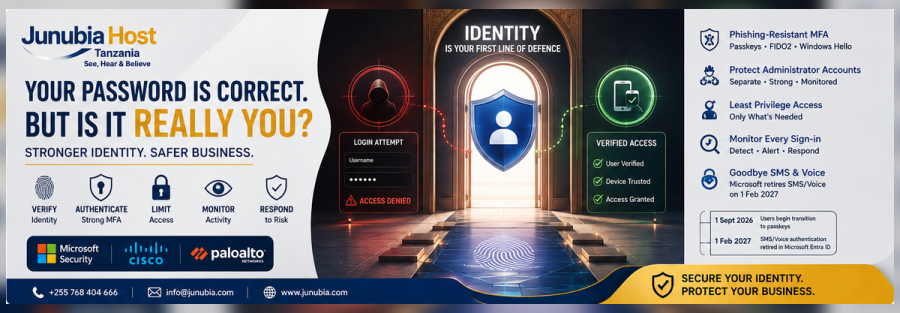
Multifactor authentication adds another verification requirement so that obtaining the password alone is less likely to result in successful access. CISA recommends MFA for business systems and advises organisations to work toward phishing-resistant MFA.
However, organisations should also understand that not all MFA methods provide the same level of protection.
For example:
SMS codes
Better than using only a password, but they are not considered phishing-resistant.
Traditional push notifications
Can improve security but may still be targeted through techniques such as repeated approval requests or social engineering.
FIDO2 security keys and passkeys
Designed to provide stronger resistance to phishing because authentication is tied to the legitimate service rather than simply asking the user to copy a code into a website.
CISA identifies FIDO/WebAuthn as a widely available phishing-resistant authentication approach and encourages organisations to plan toward stronger authentication.
Microsoft Is Moving Further Toward Passkeys
This subject is particularly important for Microsoft 365 and Microsoft Entra customers in 2026.
Microsoft currently recommends phishing-resistant methods including:
- Passkeys/FIDO2
- FIDO2 security keys
- Windows Hello for Business
- Certificate-based authentication
Microsoft says these methods provide its strongest recommended sign-in experiences.
Microsoft has also announced a transition away from Microsoft-provided SMS and voice authentication in Microsoft Entra ID.
According to Microsoft’s current schedule:
1 September 2026: users currently enabled for SMS or voice under relevant Entra authentication policies will begin being automatically enabled for passkeys in the Authentication Methods Policy.
1 February 2027: Microsoft-provided SMS and voice authentication are scheduled to be fully retired in Microsoft Entra ID.
For organisations still relying heavily on SMS or voice authentication, this creates a practical reason to review identity security now instead of waiting until the transition deadline.
1. Protect Administrator Accounts First
Administrator accounts should receive stronger protection than ordinary business accounts because they can carry significantly more authority.
Depending on the environment, administrators may be able to:
- Create users
- Reset passwords
- Assign privileges
- Change security policies
- Access sensitive systems
- Modify email settings
- Disable protection
- Create persistent access
- Manage devices
- Change application permissions
A compromised administrator can therefore create much greater damage than a compromised standard account.
Priority actions should include:
- MFA on every administrator
- Phishing-resistant authentication where possible
- Separate administrator and normal user accounts
- Minimum required privileges
- Monitoring of privileged activity
- Removal of unnecessary administrators
- Regular privilege reviews
- Immediate blocking of former administrators
The principle aligns closely with Zero Trust: strong verification combined with least-privilege access.
2. Move High-Risk Users Toward Phishing-Resistant MFA
Organisations do not necessarily need to change every employee on the same day.
A practical rollout can start with users whose compromise would create the greatest risk.
Priority users may include:
- Global administrators
- IT administrators
- Finance directors
- Accountants
- CEOs and executives
- Procurement staff
- Human-resources administrators
- Employees authorised to release payments
- Employees managing highly confidential information
- Remote administrators
Microsoft supports Conditional Access authentication strengths that can be used to require stronger authentication for appropriate users and scenarios. Microsoft’s documentation specifically identifies passkeys/FIDO2 as phishing-resistant authentication.
3. Introduce Passkeys Where Appropriate
A passkey can replace or strengthen traditional password-based authentication.
Rather than requiring an employee to remember a password and type a verification code, passkeys use cryptographic authentication associated with the legitimate service.
Depending on the organisation and technology platform, passkeys can be stored on:
- Approved devices
- Microsoft Authenticator
- Windows devices
- FIDO2 security keys
- Other supported authenticators
Microsoft describes passkeys/FIDO2 as phishing-resistant and capable of satisfying MFA requirements in supported Entra scenarios.
The organisation still needs policies covering:
- Who may register passkeys
- Which devices are approved
- How employees recover access
- What happens when devices are lost
- Administrator authentication
- Employee offboarding
Strong technology without good administration can still create security problems.
4. Check the Device as Well as the User
Identity security should not stop after authentication.
The organisation may also need to determine:
Who is requesting access?
and:
What device are they using?
For sensitive resources, access policies can consider factors such as:
- Managed versus unmanaged device
- Security-update status
- Endpoint protection
- Device compliance
- Location
- User risk
- Application sensitivity
- Authentication strength
Cisco Duo combines MFA with device and identity security capabilities, including device posture and risk-based authentication in current offerings.
This allows security decisions to move beyond the password itself.
5. Protect Against MFA Fatigue
Some attacks attempt to defeat push-based authentication by repeatedly generating MFA approval requests.
An employee may eventually press Approve simply to stop the notifications.
This is why employees should be taught:
- Never approve an authentication request they did not initiate.
- Report unexpected authentication prompts immediately.
- Do not provide authentication codes to anyone.
- IT support should never need the employee’s verification code.
- Unexpected password-reset requests should be treated as suspicious.
Where possible, organisations can gradually move higher-risk users toward phishing-resistant methods rather than relying indefinitely on basic push or SMS authentication.
6. Remove Access Immediately When Employees Leave
Employee offboarding is an identity-security process.
When an employee or contractor leaves, the organisation should review:
- User account
- Active sessions
- Authentication methods
- Administrator privileges
- Microsoft 365 access
- Business applications
- Cloud systems
- VPN or remote access
- Shared groups
- Third-party access
Unused accounts should not remain active simply because nobody has requested their removal.
Identity security requires the organisation to understand:
Who currently has access?
Why do they have it?
Do they still require it?
7. Eliminate Shared Administrator Accounts
Accounts such as:
admin@company.com
that are used by several employees can make accountability difficult.
When multiple people use the same credentials, the organisation may struggle to determine:
- Who performed an action
- Who changed a configuration
- Who approved access
- Which employee exposed the password
- Who should be removed when responsibilities change
Where technically possible, administrators should have individually identifiable accounts with appropriate roles and activity logging.
8. Review Permissions Regularly
Employees accumulate access over time.
Someone may move from sales to finance but retain access to both departments.
A temporary project administrator may still hold elevated privileges months later.
A consultant may retain access after the project finishes.
Regular reviews should identify:
- Excessive permissions
- Inactive accounts
- Old external users
- Unnecessary administrators
- Duplicate accounts
- Service accounts
- Shared accounts
- Unused applications
- Temporary access that never expired
The objective is simple:
The right person should have the right access to the right resource for the right reason.
9. Protect Third-Party Identities
Suppliers, consultants and service providers may legitimately require access to company systems.
That access should still be controlled.
Third-party identities should be:
- Individually identified
- Approved
- Limited to necessary applications
- Protected with strong authentication
- Monitored
- Time-limited where possible
- Removed after the engagement ends
Palo Alto Networks’ Cloud Identity Engine is designed to provide centralised identity and authentication information to support Zero Trust access decisions across cloud, on-premises and hybrid environments.
10. Monitor Identity Behaviour
Successful authentication should not automatically end the security process.
Organisations should review indicators such as:
- Sign-ins from unusual locations
- Impossible travel patterns
- Repeated failed attempts
- New authentication methods
- Unexpected MFA registrations
- New administrator privileges
- Suspicious application access
- Abnormal file downloads
- Unexpected session activity
- Disabled security settings
Cisco’s current Duo identity-security capabilities include identity posture visibility, device-health checks, risk-based authentication and identity threat detection in supported plans.
Identity security therefore becomes:
Authenticate → Authorise → Monitor → Reassess
rather than:
Password accepted → Trust forever
Microsoft Security, Cisco and Palo Alto Networks
Junubia Host’s cybersecurity portfolio already includes Microsoft, Cisco and Palo Alto Networks technologies. Junubia Host’s website specifically lists Microsoft security solutions, Cisco Duo and Zero Trust access capabilities, while its Palo Alto Networks partnership covers enterprise cybersecurity and Zero Trust architecture.
Microsoft Security
Can support identity and access capabilities through Microsoft Entra, including MFA, Conditional Access and phishing-resistant authentication methods.
Cisco Duo
Can support MFA, application access, device-health evaluation, FIDO2-based authentication and broader identity-security capabilities depending on the selected plan.
Palo Alto Networks
Can incorporate identity into Zero Trust security policies and provide central identity integration through Cloud Identity Engine.
The appropriate technology should be selected after reviewing the organisation’s existing identity systems, applications, devices, users and risk requirements.
Junubia Host Identity Security Process
Step 1 — Assess
Review users, administrators, Microsoft 365 accounts, applications, authentication methods and current security controls.
Step 2 — Identify high-risk accounts
Prioritise administrators, finance users, executives and employees with access to critical systems.
Step 3 — Strengthen authentication
Introduce appropriate MFA and develop a migration path toward phishing-resistant authentication.
Step 4 — Reduce unnecessary privileges
Review administrators, groups, external users and application permissions.
Step 5 — Secure devices and access
Connect identity decisions with approved devices and application-access policies where appropriate.
Step 6 — Monitor
Identify suspicious sign-ins, authentication changes and abnormal user activity.
Step 7 — Prepare response
Define what happens when an account is suspected of compromise.
Step 8 — Review regularly
Users, devices and responsibilities change. Access should change with them.
Junubia Host already provides security assessments, architecture, secure access, endpoint protection, monitoring and improvement services to organisations in Tanzania and the wider region