Finding Vulnerabilities Is Easy. Knowing What to Fix First Is Harder.
Modern organisations operate hundreds or thousands of technology assets:
- Employee laptops
- Servers
- Network devices
- Cloud workloads
- Business applications
- Browsers
- Mobile devices
- Containers
- Virtual machines
- Internet-facing services
Every operating system, application and device can potentially contain vulnerabilities.
The challenge is not simply discovering them.
The real questions are:
Which vulnerability creates the greatest risk?
Which system is exposed to attackers?
Is the vulnerability already being exploited?
Which business service would be affected?
What should IT fix first?
This is why modern vulnerability management is increasingly risk based rather than simply producing a long list of technical findings.
Microsoft Defender Vulnerability Management, for example, provides continuous vulnerability assessment, asset visibility, prioritised security recommendations and remediation workflows across supported endpoints and cloud workloads.
Palo Alto Networks’ Exposure Management capabilities similarly focus on consolidating exposures from multiple sources, prioritising critical cases and helping security and IT teams organise remediation around the fixes that can reduce the most risk.
What Is Vulnerability Management?
A vulnerability is a weakness in a system, application, configuration or device that may be exploited.
Examples can include:
- Missing security updates
- Unsupported operating systems
- Vulnerable software versions
- Weak security configurations
- Internet-facing services
- Outdated browsers
- Vulnerable network equipment
- Old firmware
- Misconfigured cloud resources
- Unnecessary software
- Weak encryption
- Insecure protocols
Vulnerability management is the continuous process of:
Discovering → Assessing → Prioritising → Remediating → Verifying
It should not be treated as an annual scan.
New vulnerabilities appear regularly, systems change, new devices are introduced and attackers continuously adapt.
1. Know What Technology You Actually Have
You cannot patch or secure a system you do not know exists.
The first step is maintaining visibility into:
- Laptops
- Desktops
- Servers
- Virtual machines
- Cloud workloads
- Containers
- Mobile devices
- Network equipment
- Business applications
- Browsers
- Firmware
- Internet-facing services
Asset discovery is one of the most important foundations of vulnerability management.
Microsoft Defender Vulnerability Management includes continuous asset and vulnerability visibility across supported devices and workloads rather than relying only on occasional scans.
Ask your IT team:
Do we know every device that can access company systems?
Do we know which operating systems and applications are installed?
Can we identify unsupported or outdated software?
2. Do Not Treat Every Vulnerability as Equally Important
A vulnerability scanner may identify hundreds or thousands of findings.
IT teams rarely have enough time to fix everything immediately.
A better approach is to ask:
Is the system internet facing?
An exposed server can represent greater immediate risk than an isolated internal device.
Is the vulnerability being exploited?
CISA maintains its Known Exploited Vulnerabilities, or KEV, programme to help organisations identify vulnerabilities with evidence of real-world exploitation.
In 2026, CISA further emphasised risk-based patch prioritisation and rapid remediation of known exploited vulnerabilities rather than relying only on severity scores.
How important is the affected system?
A vulnerability on a critical finance server may require a different response from the same weakness on a low-impact test system.
Are security controls already reducing the risk?
Firewalls, segmentation, endpoint protection or application controls may reduce the exposure while a permanent fix is prepared.
The objective is:
Fix the vulnerabilities most likely to cause meaningful business damage first.
3. Prioritise Known Exploited Vulnerabilities
A vulnerability can have a high technical severity without necessarily being actively exploited.
Another vulnerability with a lower score may already be heavily used by attackers.
That is why organisations should monitor threat intelligence and known exploitation.
CISA’s 2026 risk-based security-update guidance specifically directs attention toward vulnerabilities listed in its Known Exploited Vulnerabilities catalogue and emphasises rapid remediation when there is evidence of active exploitation.
For a Tanzanian business, a practical rule is:
Do not prioritise only by CVSS score.
Also consider:
- Exploitation activity
- Internet exposure
- Business importance
- Asset sensitivity
- Existing controls
- Ease of exploitation
- Availability of a patch or mitigation
4. Patch Internet-Facing Systems Quickly
Internet-facing systems are exposed continuously.
Examples may include:
- Firewalls
- VPN gateways
- Web servers
- Remote-access systems
- Email gateways
- Cloud applications
- Public APIs
When a critical vulnerability affects one of these systems, attackers may begin scanning for vulnerable organisations very quickly.
Organisations should therefore maintain a clear process for:
- Receiving vulnerability information
- Identifying affected systems
- Assessing business risk
- Testing the patch
- Approving emergency changes where required
- Deploying the update
- Confirming successful remediation
CISA’s 2026 implementation guidance stresses timely patching and stabilisation for high-risk and known exploited vulnerabilities while coordinating remediation with business continuity.
5. Vulnerability Management Is More Than Windows Updates
Patching Windows computers is important.
But organisations also need to consider:
- Linux systems
- Network devices
- Firewalls
- Browsers
- Microsoft Office
- Third-party applications
- Firmware
- Cloud workloads
- Containers
- Databases
- Web applications
A laptop can be fully updated at operating-system level while still running a vulnerable third-party application.
Modern vulnerability-management platforms therefore look beyond basic operating-system patching.
Microsoft Defender Vulnerability Management provides visibility into devices, applications, browser extensions, certificates and other asset information across supported environments.
6. Remove Software You Do Not Need
Sometimes the safest patch is removing the application entirely.
Every unnecessary application increases:
- Attack surface
- Patch requirements
- Administrative effort
- Licensing complexity
- Potential vulnerabilities
Ask:
Does this application still serve a business purpose?
If not, consider removing it rather than maintaining another piece of software indefinitely.
This is particularly important for:
- Old remote-access software
- Abandoned tools
- Legacy browser plugins
- Trial applications
- Unsupported software
- Former project applications
7. Replace Unsupported Systems
Some vulnerabilities cannot be solved permanently because the vendor no longer provides security updates.
Unsupported systems may include:
- Old operating systems
- End-of-life applications
- Legacy servers
- Old network devices
- Unsupported firmware
Keeping unsupported technology in production can create long-term security risk.
Where replacement cannot happen immediately, organisations should consider temporary risk-reduction controls such as:
- Network segmentation
- Restricted access
- Strong monitoring
- Application controls
- Additional firewall policies
These are compensating controls—not permanent substitutes for supported technology.
8. Connect Vulnerability Management with Endpoint Security
Our previous content covered Endpoint Security and EDR.
These two areas should work together.
EDR asks:
Is this endpoint under attack?
Vulnerability management asks:
Which weaknesses could attackers exploit before the attack begins?
Microsoft Defender Vulnerability Management is designed to complement endpoint detection and response by helping organisations identify, prioritise and remediate vulnerabilities before they are exploited.
A mature endpoint-security programme should therefore include:
Prevent → Assess → Patch → Detect → Respond
9. Connect Vulnerabilities with the Business
A vulnerability report containing only technical identifiers may not help management make decisions.
Security teams should be able to explain:
What system is affected?
Which business function depends on it?
Is it internet facing?
Is exploitation known?
What could happen if it is compromised?
How quickly should it be fixed?
Risk-based vulnerability management connects technical security information with business context.
Palo Alto Networks’ Exposure Management is designed around consolidating exposure information and prioritising the cases that matter most, including identifying common remediation actions that address multiple vulnerabilities.
10. Establish Remediation Service Levels
Organisations should define how quickly vulnerabilities should be addressed.
For example:
Critical and actively exploited
Immediate escalation.
Critical internet-facing
Emergency remediation process.
High risk
Short remediation deadline.
Medium risk
Normal scheduled remediation.
Low risk
Address according to maintenance planning.
The exact timelines should reflect the organisation’s:
- Industry
- Business risk
- Regulatory obligations
- Operational requirements
- Technology environment
The important point is to prevent vulnerabilities from remaining unresolved simply because nobody owns them.
11. Assign an Owner to Every Important Vulnerability
Security teams often identify vulnerabilities.
IT teams usually perform the remediation.
Without a clear workflow, problems can remain open for months.
A good process should identify:
Finding → Asset → Owner → Action → Deadline → Verification
Microsoft Defender Vulnerability Management includes remediation workflows designed to connect security recommendations with IT actions and track progress.
Palo Alto Networks Exposure Management can likewise group exposures around common fixes and route remediation activity through security and IT workflows.
12. Verify That the Vulnerability Was Actually Fixed
Installing a patch is not the final step.
Organisations should confirm:
- Was the patch deployed?
- Did the installation succeed?
- Does the vulnerable version still exist?
- Did any device miss the update?
- Did the remediation introduce operational problems?
Vulnerability management should provide evidence that risk has actually decreased.
The process should be:
Identify → Fix → Verify
not:
Identify → Send ticket → Assume fixed
13. Measure Risk Reduction, Not Ticket Volume
Security teams can close hundreds of low-risk findings and still leave one dangerous internet-facing vulnerability unresolved.
Useful measurements may include:
- Number of critical vulnerabilities
- Known exploited vulnerabilities
- Internet-facing exposures
- Average remediation time
- Percentage of high-risk vulnerabilities fixed within target
- Unsupported assets
- Risk trend over time
The objective is not to make the vulnerability list look smaller.
The objective is to make the organisation harder to compromise.
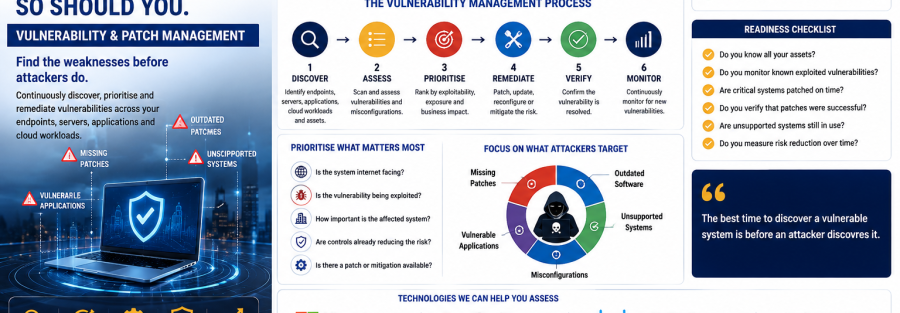
Junubia Host Vulnerability Management Process
1. Discover
Identify endpoints, servers, applications, cloud workloads and other relevant assets.
2. Assess
Identify vulnerabilities, misconfigurations and unsupported technology.
3. Prioritise
Rank findings using exploitability, exposure, asset importance and business impact.
4. Plan
Assign remediation owners and appropriate deadlines.
5. Patch or Mitigate
Deploy updates, change configuration, remove unnecessary software or apply temporary compensating controls.
6. Verify
Confirm the vulnerability is no longer present.
7. Monitor
Continue checking for new vulnerabilities and configuration changes.
8. Report
Provide management with clear information about risk and remediation progress.
Technologies Junubia Host Can Help Assess
Microsoft Defender Vulnerability Management
Microsoft Defender Vulnerability Management provides continuous asset discovery, vulnerability assessment, prioritised security recommendations, remediation workflows and risk visibility across supported endpoints and cloud workloads.
Palo Alto Networks Cortex Exposure Management
Cortex Exposure Management consolidates exposure information from Palo Alto Networks and supported third-party sources and helps defenders prioritise and organise remediation around the most important risks.
Broader Cisco Security Environment
Cisco security technologies can contribute network, endpoint, identity and XDR visibility to an organisation’s broader risk-management architecture. Organisations should note that Cisco announced end-of-sale for its standalone Cisco Vulnerability Management product in March 2026, so new vulnerability-management architecture should be designed around currently supported products and integrations rather than assuming that legacy product remains orderable.
Junubia Host can help customers assess the right architecture based on their existing Microsoft, Cisco, Palo Alto Networks and other enterprise systems.
Vulnerability Management Readiness Checklist
Ask your IT team:
- Do we know every endpoint and server?
- Can we identify unsupported software?
- Do we continuously detect new vulnerabilities?
- Do we monitor CISA’s known exploited vulnerabilities?
- Are internet-facing systems prioritised?
- Who owns each critical vulnerability?
- How quickly do we patch high-risk systems?
- Do we check third-party applications?
- Are cloud workloads included?
- Can we identify vulnerable applications on remote devices?
- Do we verify that patches succeeded?
- Can management see whether cybersecurity risk is going down?
If several answers are unclear, your organisation may benefit from a Vulnerability & Patch Management Assessment.