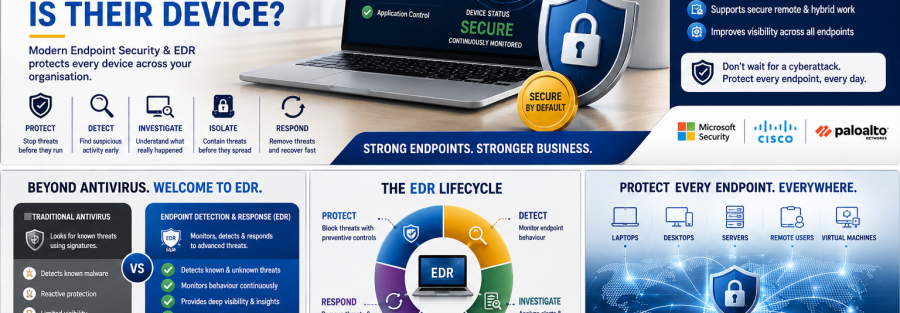
Every Business Device Can Become a Cybersecurity Entry Point
An employee receives a company laptop.
It has Microsoft 365.
It connects to company email.
It accesses SharePoint, financial systems, customer information and internal applications.
Everything appears normal.
But what happens if that device becomes compromised?
An attacker may attempt to:
- Steal employee credentials
- Capture business information
- Install ransomware
- Run malicious scripts
- Access other business systems
- Disable security controls
- Establish persistent access
- Move from one system to another
- Exfiltrate confidential information
This is why protecting the identity without protecting the device leaves an important security gap.
Modern endpoint security is designed to provide more than traditional signature-based antivirus. EDR technologies continuously monitor endpoint activity to help security teams detect, investigate and respond to threats that bypass initial preventive controls.
What Is an Endpoint?
An endpoint is a device or system that connects to and interacts with organisational resources.
Depending on the environment, endpoints can include:
- Employee laptops
- Desktop computers
- Servers
- Workstations
- Remote computers
- Supported mobile devices
- Virtual machines
- Cloud-hosted workloads
Each endpoint may contain applications, credentials, business information and connections to other organisational systems.
That makes endpoints valuable targets for attackers.
Antivirus Is Important—but It Is Not the Whole Security Strategy
Traditional antivirus commonly focuses on identifying and blocking known malicious files.
That remains useful.
But modern attackers may also use:
- Legitimate system tools
- PowerShell
- Scripts
- Compromised credentials
- Memory-based attacks
- Application vulnerabilities
- Remote administration tools
- Previously unseen malware
- Fileless techniques
Cisco explains that endpoint security is broader than antivirus because it combines preventive protection with ongoing detection, investigation and response.
The question therefore changes from:
“Did antivirus find a virus?”
to:
“Is anything suspicious happening on this device right now?”
1. Prevent Threats Before They Execute
Endpoint security should first attempt to prevent malicious activity.
Controls may include:
- Antivirus and antimalware
- Behaviour-based protection
- Attack-surface reduction
- Application control
- Web protection
- Exploit protection
- Device controls
- Host firewall policies
- Security updates
- Controlled administrative privileges
Microsoft Defender for Endpoint combines preventive protection with post-breach detection, automated investigation and response capabilities.
Palo Alto Networks’ Cortex XDR endpoint agent likewise includes endpoint-protection capabilities such as next-generation antivirus and EDR, with additional endpoint controls depending on licensing and configuration.
2. Reduce the Attack Surface
Endpoint security should also reduce the number of opportunities available to attackers.
For example:
Does every employee need local administrator rights?
Can any application be installed?
Can Microsoft Office documents freely launch scripts?
Can employees execute unknown applications?
Can unauthorised USB devices connect to sensitive systems?
Can ransomware modify every business folder?
An attack-surface reduction programme may include:
- Restricting macros
- Blocking suspicious script behaviour
- Limiting administrator rights
- Application allowlisting
- Restricting unnecessary services
- Device control
- Protected folders
- Secure browser configurations
- Removing unsupported software
CISA recommends application allowlisting and endpoint detection and response as important measures for preventing unauthorised software execution and improving detection.
3. Continuously Monitor Endpoint Behaviour
Prevention will never guarantee that every attack is stopped.
Security teams therefore need visibility into endpoint behaviour.
Potential warning signs can include:
- A suspicious process launching
- Unusual PowerShell commands
- Security software being disabled
- Unexpected administrator privileges
- Large numbers of files changing rapidly
- An unfamiliar program contacting external servers
- Credential-dumping activity
- Suspicious remote connections
- Unexpected scheduled tasks
- Abnormal network connections
EDR continuously collects and analyses endpoint activity to support threat detection and investigation.
This allows security teams to investigate behaviour rather than relying only on individual malware signatures.
4. Investigate What Actually Happened
A security alert should answer more than:
“Something bad happened.”
Security teams also need to understand:
- Which device was affected?
- Which account was involved?
- What process started the activity?
- What happened before the alert?
- Which files were accessed?
- Did the attack contact other systems?
- Did the attacker move laterally?
- Were credentials exposed?
- Are other endpoints affected?
EDR provides telemetry that helps analysts reconstruct attack activity and determine the scope of an incident.
Microsoft Defender for Endpoint includes endpoint detection and response capabilities designed to surface advanced attacks and support investigation.
Cisco Secure Endpoint similarly focuses on prevention, detection, threat hunting and response.
5. Isolate a Compromised Device
Imagine ransomware is detected on one laptop.
Should that computer remain connected to:
- File servers?
- Financial systems?
- Other employee computers?
- Shared network resources?
- Business applications?
No.
A key incident-response capability is containment.
Depending on the selected security platform and configuration, an affected device may be isolated from organisational resources while maintaining the connectivity required for investigation and remediation.
The objective is:
Stop one compromised device from becoming an organisation-wide incident.
EDR is particularly valuable when attackers attempt to move between systems because endpoint telemetry can help reveal suspicious host-to-host connections.
6. Investigate Automatically Where Appropriate
Security teams can receive large numbers of alerts.
Manually investigating every alert can become difficult.
Modern platforms may therefore provide automated investigation and remediation capabilities.
Microsoft Defender for Endpoint includes automated investigation and response functionality designed to examine alerts and take appropriate remediation actions according to the product and configuration.
Automation does not eliminate the need for security professionals.
Instead, it can help security teams focus their attention on incidents requiring deeper investigation.
7. Protect Against Ransomware Behaviour
Ransomware may begin by:
- Running malicious executables
- Exploiting vulnerabilities
- Stealing credentials
- Disabling protection
- Modifying large numbers of files
- Attempting lateral movement
Modern endpoint platforms can analyse behaviours associated with these activities.
Palo Alto Networks documents anti-ransomware protection in Cortex XDR that monitors encryption-related behaviour and can halt ransomware activity according to configured endpoint-security capabilities.
Endpoint security should work together with identity protection, secure networks, user awareness and incident-response planning—not independently.
8. Keep Endpoint Security Policies Consistent
A common problem occurs when:
- Head-office laptops have protection
- Branch devices do not
- Executives have different settings
- New computers are never enrolled
- Old devices remain active
- Servers are forgotten
- Remote employees rarely connect to corporate infrastructure
Endpoint security should therefore include central management.
Administrators need to know:
- Which devices exist
- Which are protected
- Which are missing security updates
- Which have active alerts
- Which have outdated agents
- Which users own each device
- Which devices are inactive
- Which require investigation
The objective is not simply to install software.
The objective is to maintain continuous visibility and control.
9. Protect Remote Employees
Employees no longer work only inside the corporate office.
A business laptop may be used from:
- Home
- Hotels
- Airports
- Customer locations
- Project sites
- Branch offices
- Public networks
Endpoint protection therefore needs to continue operating even when the employee is outside the traditional office network.
This is another reason endpoint security has become a critical part of Zero Trust.
The device should be assessed as part of every access decision.
Yesterday’s identity-security question was:
Is this really the authorised user?
Today’s endpoint-security question is:
Is this authorised user connecting from a secure device?
10. Protect Administrator and Technical Devices More Strongly
Not every endpoint carries the same level of risk.
An administrator workstation can access more sensitive resources than a general employee laptop.
High-risk endpoints may include devices used by:
- System administrators
- Finance teams
- Executives
- Database administrators
- Network engineers
- Cybersecurity teams
- Procurement employees
- HR administrators
These devices may require stronger controls such as:
- Tighter application restrictions
- Strong authentication
- Higher monitoring levels
- Limited administrative privileges
- Additional attack-surface reduction policies
- Privileged workstation models
- Greater investigation priority
Security investment should follow business risk, not simply device count.
11. Remove Unmanaged and Forgotten Devices
Organisations often discover computers that nobody actively manages.
Examples include:
- Old laptops
- Former employee devices
- Temporary project computers
- Forgotten servers
- Test systems
- Old virtual machines
- Personal devices accessing company resources
These systems can create security gaps.
A mature endpoint-security programme should regularly answer:
What devices exist?
Who owns them?
Are they still required?
Are they protected?
Should they still have access?
Unknown devices should not automatically receive trusted access.
Endpoint Security Technologies Junubia Host Can Help Assess
The appropriate solution depends on the organisation’s existing technology, number of devices, risk level, applications and security requirements.
Microsoft Security
Microsoft Defender for Endpoint provides preventive protection, endpoint detection and response, investigation and response capabilities across supported environments.
Microsoft Defender for Business also provides endpoint-security capabilities aimed at smaller and medium-sized organisations, including threat and vulnerability management, attack-surface reduction, automated investigation and EDR functionality.
Cisco Secure Endpoint
Cisco Secure Endpoint provides cloud-delivered endpoint detection and response capabilities designed to detect, contain and remediate advanced threats.
Palo Alto Networks Cortex XDR
Cortex XDR combines endpoint protection and EDR with broader visibility across endpoint, network, cloud, identity and third-party security information.
The correct solution should be selected after assessing the organisation, rather than simply choosing the product with the longest feature list.
Junubia Host Endpoint Security Process
Step 1 — Discover
Identify laptops, desktops, servers and other relevant endpoints.
Step 2 — Assess
Review current protection, operating systems, administrator rights, applications and security gaps.
Step 3 — Prioritise
Identify high-risk devices and users.
Step 4 — Protect
Deploy or improve endpoint-prevention policies.
Step 5 — Detect
Configure appropriate EDR monitoring and alerts.
Step 6 — Respond
Define isolation, investigation, remediation and escalation procedures.
Step 7 — Monitor
Review device health, security alerts and policy compliance.
Step 8 — Improve
Use incident findings to strengthen protection continuously.
Endpoint Security Checklist
Ask your IT team these questions today:
☐ Do we know every business laptop and server?
☐ Is endpoint protection installed on all managed devices?
☐ Are security updates current?
☐ Do ordinary employees have unnecessary administrator privileges?
☐ Can we detect suspicious activity after malware bypasses prevention?
☐ Can we investigate what happened on a compromised device?
☐ Can we rapidly isolate an infected computer?
☐ Who receives endpoint-security alerts?
☐ Who investigates those alerts?
☐ Are executive, finance and administrator devices treated as higher risk?
☐ Are former employee devices and accounts removed?
☐ Do remote devices receive the same level of protection?
If your organisation cannot confidently answer these questions, an endpoint-security assessment can identify where improvement is required.