One Infected Laptop Should Not Expose Your Entire Organisation
Consider a simple scenario.
An employee’s laptop becomes compromised through phishing, stolen credentials, malicious software, or another attack.
The immediate problem is the laptop.
The bigger question is:
What can that laptop reach next?
If your network is largely flat, the compromised system may be able to communicate with resources that the employee never actually needed to access.
These might include:
- Finance systems
- File servers
- Databases
- Administrative systems
- Other employee devices
- Backup infrastructure
- Business applications
- Internal management interfaces
- Sensitive departmental information
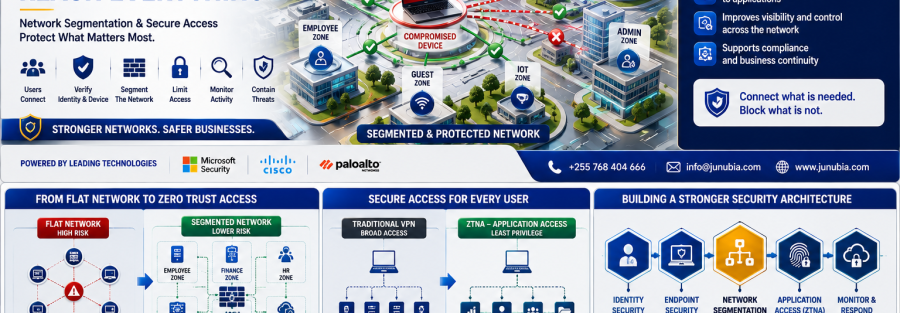
Network segmentation addresses this problem by separating systems and users into controlled areas and defining which communication is genuinely required. NIST notes that internal firewalls and segmentation can isolate sensitive resources and reduce lateral movement after an attacker enters an environment.
The objective is not simply to block attacks at the internet boundary.
It is to make sure that one successful compromise cannot easily become an organisation-wide compromise.
What Is Network Segmentation?
Network segmentation divides a larger environment into smaller security zones or access boundaries.
Instead of treating every connected device as though it belongs to one trusted network, different groups can receive different access.
For example:
Finance users may access accounting and ERP systems.
HR users may access HR applications.
General employees may access common business applications.
Guest devices may access the internet but not internal systems.
Administrators may use dedicated management resources.
Servers and databases may be separated from ordinary employee devices.
Backup infrastructure may have highly restricted connectivity.
Palo Alto Networks’ current firewall guidance describes segmentation as creating zones for areas such as sensitive data, business applications, finance, IT, marketing, and engineering, then applying different protection and access policies to each.
Why a Flat Network Creates More Risk
A flat network prioritises easy connectivity.
Unfortunately, attackers also benefit from easy connectivity.
After gaining an initial foothold, an attacker may attempt lateral movement—moving from the originally compromised system toward more valuable resources.
Cisco’s current segmentation guidance specifically positions segmentation as a way to isolate systems, limit lateral movement, and reduce the “blast radius” of a security incident.
This changes the security question from:
“Did the attacker get in?”
to:
“If something gets compromised, how far can it go?”
That second question is central to modern Zero Trust architecture.
1. Separate Users According to Business Need
Different departments do not require the same access.
A properly designed environment can distinguish between:
- Finance
- HR
- Procurement
- Management
- IT
- General employees
- Contractors
- Guests
- Technical teams
- External suppliers
Access should follow the employee’s responsibilities rather than simply their physical location.
For example, joining the office Wi-Fi should not automatically mean that a user can communicate with every internal system.
The goal should be:
Right user → Right resource → Right level of access
2. Separate Critical Servers from Employee Devices
Servers containing business applications and sensitive information should not necessarily share unrestricted connectivity with employee laptops.
Critical systems may include:
- ERP
- Finance databases
- HR platforms
- File servers
- Active Directory services
- Internal applications
- Customer databases
- Payment platforms
- Security-management systems
Microsoft’s Zero Trust network guidance recommends segmentation specifically to minimise the blast radius of an attack and prevent compromise from spreading between environments.
A compromised general employee device therefore does not automatically need a direct path to sensitive infrastructure.
3. Protect Backup Infrastructure Separately
Backups are particularly important during ransomware incidents.
If backup systems are accessible using the same broad network routes and administrative credentials as production systems, attackers may attempt to compromise them as well.
Backup access should therefore be deliberately restricted.
Only authorised systems and administrators should be able to communicate with backup infrastructure according to the organisation’s operational requirements.
Segmentation should complement—not replace—offline or otherwise appropriately protected backup strategies.
4. Separate Guest and Personal Devices
Visitors should not join the same trusted environment used by:
- Finance systems
- Servers
- Company printers
- Administrative interfaces
- Employee laptops
- Internal applications
Guest Wi-Fi can instead provide isolated internet access.
The same thinking applies to personal or unmanaged devices.
They should not automatically receive the same network privileges as an approved company-managed endpoint.
Cisco’s segmentation material highlights the complexity created by campuses containing corporate devices, guest Wi-Fi, mobile devices, contractors, visitors, and other heterogeneous endpoints—one reason identity and context are increasingly important to segmentation policy.
5. Consider IoT and Smart Devices Separately
Modern organisations may connect devices such as:
- CCTV cameras
- Smart televisions
- Printers
- Biometric systems
- Access-control equipment
- Meeting-room devices
- Sensors
- Building-management systems
These devices may not require access to sensitive business applications.
Putting them into controlled network segments can reduce unnecessary communication paths between operational devices and critical corporate systems.
Modern segmentation is increasingly moving beyond static IP addresses toward identity, device type, behaviour, and contextual information. Palo Alto Networks highlighted this shift in its 2026 contextual-segmentation guidance.
6. Stop Giving Remote Users the Whole Network
Traditional VPN access can sometimes provide broad network connectivity after a user successfully connects.
Modern Zero Trust Network Access — ZTNA takes a more targeted approach.
Instead of:
“Connect this user to our internal network.”
the policy can become:
“Allow this verified user to access this specific application.”
Cisco describes ZTNA as granting least-privilege access to individual applications rather than placing the user broadly onto a network. This can reduce lateral movement and limit contractor or partner access.
This model can be useful for:
- Remote employees
- Travelling executives
- Contractors
- ERP consultants
- Support vendors
- Branch users
- External technology providers
7. Apply Per-Application Access
Suppose an external consultant needs access to your ERP platform.
Do they also need access to:
- Internal file servers?
- Finance databases?
- CCTV systems?
- Employee devices?
- Network-management interfaces?
Probably not.
Per-application access allows the organisation to publish and protect specific resources while keeping unrelated systems unavailable.
Microsoft Entra Private Access supports per-app access and user assignments so organisations can move from broad network access toward granular least-privilege private application access.
Cisco Secure Access similarly provides app-specific ZTNA to private applications and can deny access by default until policy explicitly grants it.
Palo Alto Networks Prisma Access ZTNA applies fine-grained least-privilege access with continuous trust verification and security inspection.
8. Verify the User and Device Before Granting Access
Segmentation should not depend only on IP addresses.
A modern access decision can consider:
- User identity
- Department
- Device type
- Device security status
- Authentication strength
- Application requested
- Location
- Risk level
- User privileges
This connects today’s topic directly with our previous Identity Security and Endpoint Security campaigns.
The organisation can ask:
Is this the authorised employee?
Is their device secure?
Which application do they actually need?
What should they be allowed to do there?
Cisco Secure Access combines ZTNA with contextual information and least-privilege policy, while Microsoft Global Secure Access combines network, identity, and endpoint access controls around Zero Trust principles.
9. Inspect Traffic Between Segments
Creating network segments without controlling communication between them provides limited value.
Security policies should specify:
- Which segment can communicate with another
- Which applications are permitted
- Which ports or protocols are required
- Which users may access the resource
- Whether traffic requires inspection
- Which activities should generate alerts
Next-generation firewall technologies can enforce security policies between zones rather than relying exclusively on an internet perimeter.
Palo Alto Networks recommends routing relevant traffic through firewall-controlled zones so different business areas can receive appropriate protection and visibility.
10. Protect East-West Traffic
Organisations often focus heavily on north-south traffic—traffic entering or leaving the organisation.
But security also needs to consider east-west traffic, meaning communication occurring internally between systems and workloads.
NIST notes that modern enterprise applications and distributed infrastructure generate substantial internal traffic, making lateral movement and internal visibility important security considerations.
For example:
Employee laptop → application server
Application server → database
Server → server
Virtual machine → virtual machine
Cloud workload → internal resource
Those connections require security policies too.
11. Start with Visibility Before Blocking Everything
Segmentation should not be implemented carelessly.
Blocking legitimate dependencies can interrupt business applications.
Before enforcing strict policies, organisations should understand:
- Which devices communicate
- Which applications rely on each other
- Which users access each resource
- Which services require specific ports
- Which connections are unnecessary
- Which systems are business critical
Cisco’s 2026 segmentation research emphasises that insufficient visibility and operational complexity are major reasons segmentation initiatives struggle. It recommends careful scope definition, visibility, policy testing, and phased implementation.
The correct approach is therefore not:
Block everything tomorrow.
It is:
Discover → Design → Test → Segment → Monitor → Improve
12. Do Not Replace Everything at Once
Organisations can phase network segmentation.
Phase 1 — Understand the environment
Identify users, devices, servers, applications, and communication patterns.
Phase 2 — Protect the most critical systems
Start with high-value resources such as finance, core databases, administrative infrastructure, and critical servers.
Phase 3 — Separate users and devices
Create appropriate boundaries for employees, administrators, guests, IoT, and unmanaged devices.
Phase 4 — Improve remote access
Move suitable users from broad network connectivity toward application-level access.
Phase 5 — Add stronger context
Use identity, device health, and risk to make more intelligent access decisions.
Phase 6 — Monitor and optimise
Review blocked traffic, alerts, changing applications, and new business requirements.
This phased approach aligns with the reality that segmentation is both a technical and organisational project.
Technologies Junubia Host Can Help Assess
Junubia Host’s published cybersecurity portfolio includes network security, secure remote access, assessments, endpoint protection, monitoring, and solutions from vendors including Cisco and Palo Alto Networks; its site also lists Microsoft security capabilities.
Microsoft Security
Microsoft Entra Private Access supports Zero Trust access to private applications and granular per-app segmentation with Conditional Access.
Cisco
Cisco’s portfolio includes segmentation technologies and Cisco Secure Access, which provides least-privilege ZTNA for private applications. Junubia Host’s Cisco service page also highlights secure networking, Duo, Zero Trust, and Secure Access.
Palo Alto Networks
Palo Alto Networks supports network segmentation through NGFW security zones and secure application access through Prisma Access/ZTNA. Junubia Host’s current Palo Alto Networks page lists firewall, secure remote access, Zero Trust architecture, and broader cybersecurity services.
The correct architecture should always follow an assessment of the customer’s existing network and applications.
Junubia Host Network Security Process
1. Discover — Identify users, endpoints, servers, applications, networks, branches, cloud resources, and external access.
2. Map — Understand legitimate communication flows and critical business dependencies.
3. Prioritise — Identify finance systems, databases, administrator environments, backups, and other high-value resources.
4. Design — Develop appropriate zones, policies, remote-access methods, and access rules.
5. Test — Validate policies before broad enforcement.
6. Segment — Apply approved network and application-level controls.
7. Monitor — Review blocked communication, suspicious access, and policy changes.
8. Improve — Adjust controls as users, applications, devices, and business requirements evolve.
Network Segmentation Readiness Checklist
Ask your technical team:
- Do we know which systems communicate with each other?
- Can ordinary employee devices reach critical servers unnecessarily?
- Are finance, HR, IT, and guest users treated differently?
- Is guest Wi-Fi isolated from corporate systems?
- Are IoT devices separated from sensitive environments?
- Are backup systems restricted?
- Do contractors receive only the applications they need?
- Does remote access provide broad network connectivity or application-specific access?
- Can we isolate a compromised device or network area?
- Do our firewalls inspect traffic between important internal zones?
- Are administrator networks separated?
- Can we identify unusual lateral movement?
If several answers are unclear, the organisation may benefit from a Network Segmentation & Secure Access Assessment.