Your Firewall May Be Working Perfectly—While Sensitive Information Still Leaves the Organisation
Cybersecurity discussions often focus on attackers getting into an organisation.
But organisations must also ask:
What information is going out?
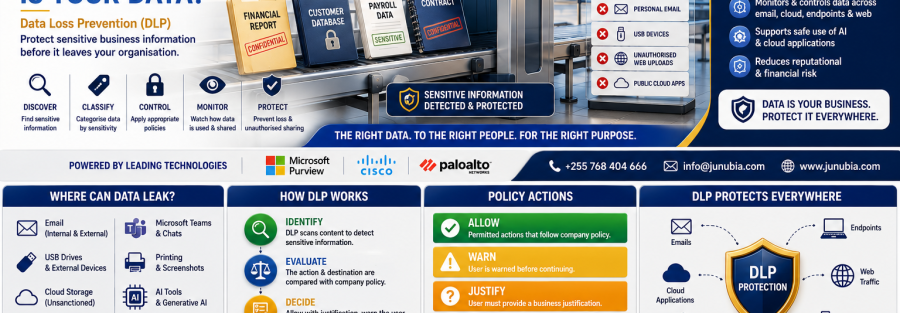
Sensitive business information may leave through:
- Microsoft Teams
- Cloud-storage platforms
- Web uploads
- USB drives
- Personal devices
- Printing
- Messaging platforms
- External collaboration
- Unauthorised SaaS applications
Sometimes this is malicious.
But often it is simply an employee trying to complete their work quickly.
For example, an employee might:
- email a spreadsheet to a personal account to continue working at home,
- upload a document to an unsanctioned cloud-storage service,
- copy customer information onto a USB drive,
- accidentally send payroll information to the wrong recipient,
- share a confidential SharePoint file externally,
- or paste sensitive information into a service that the organisation has not approved.
Microsoft describes DLP as a way for organisations to identify, monitor and protect sensitive information from inappropriate sharing and risky activity. Microsoft Purview policies can analyse sensitive content and apply actions depending on the location, user activity and policy configured.
What Is Data Loss Prevention?
Data Loss Prevention is a combination of technology, policies and business processes designed to reduce inappropriate disclosure or movement of sensitive information.
DLP can help an organisation answer:
What information is sensitive?
Where does it exist?
Who is using it?
Where is it going?
Should this action be allowed?
Should the user receive a warning?
Should the activity be blocked?
Should the security team investigate?
Modern DLP should therefore support legitimate business activity rather than simply blocking everything.
Microsoft specifically recommends planning DLP with legal, compliance, risk, security and business stakeholders because overly restrictive policies can interrupt legitimate work.
1. Identify the Information That Matters Most
Not every document requires the same level of protection.
An organisation should first identify its most important information.
This may include:
Financial information
- Bank-account details
- Payment instructions
- Financial reports
- Credit information
- Pricing
- Payroll records
- Financial forecasts
Customer information
- Customer names
- Contact information
- Account records
- Transaction information
- Application documents
Employee information
- Payroll
- Employment agreements
- Identification documents
- Performance information
- HR records
Corporate information
- Contracts
- Board documents
- Strategic plans
- Tender submissions
- Proprietary information
- Internal reports
Technical information
- Network diagrams
- System configurations
- Credentials
- Application source files
- Engineering documentation
DLP becomes far more effective when policies protect clearly defined information rather than attempting to treat every document as equally sensitive.
2. Classify Information According to Sensitivity
A practical organisation might use classifications such as:
Public
Approved information that can be publicly distributed.
Internal
Information intended for employees and authorised business partners.
Confidential
Information requiring controlled access.
Highly Confidential
Critical information requiring the strongest protection and strict sharing limitations.
The exact labels should match the organisation’s operations and policies.
The objective is to give employees a simple understanding of:
What information am I handling, and what am I allowed to do with it?
3. Protect Sensitive Email
Email remains one of the easiest ways for information to leave an organisation.
Consider a finance employee attempting to send a spreadsheet containing confidential financial data to a personal email account.
Depending on the organisation’s DLP rules, the system might:
- Detect sensitive information.
- Warn the employee.
- Require a business justification.
- Record the activity.
- Block transmission.
- Alert security or compliance personnel.
Microsoft Purview DLP can apply policies to supported Exchange and Outlook activities, while Cisco Secure Access can integrate DLP controls with outgoing cloud-native email through supported Cisco email-security services.
This does not mean every attachment should be blocked.
Policies should reflect business context and risk.
4. Protect Microsoft Teams, SharePoint and OneDrive
Modern employees collaborate constantly.
Documents move between:
- Teams
- SharePoint
- OneDrive
- External partners
This creates productivity—but it also creates data-security responsibilities.
Microsoft Purview DLP can apply controls across Microsoft 365 locations including Exchange, SharePoint, OneDrive and Teams, depending on the organisation’s licensing and configuration.
For example:
An employee posts sensitive information into a Teams channel.
A DLP policy could identify that information and take an appropriate action according to organisational rules.
5. Control USB and External Devices
USB drives can be convenient.
They can also make confidential information very easy to copy.
Consider a computer containing:
- Customer records
- Financial reports
- employee information
- contracts
- project documentation
Should every employee be able to copy all this information to any USB device?
Probably not.
Depending on configuration, Microsoft Purview Endpoint DLP can monitor or restrict supported activities involving sensitive files and removable storage. Cisco Secure Access DLP also documents controls for transfers to external devices including USB storage, Bluetooth devices and network shares in supported packages.
Different users may require different policies.
For example:
General employee: restricted.
Approved technical administrator: authorised under controlled circumstances.
Finance employee: sensitive financial records blocked from removable media.
6. Control Sensitive Web Uploads
Employees regularly use web applications.
But not every website or cloud platform is approved for sensitive corporate information.
A user might upload a customer database to:
- personal cloud storage,
- an online file converter,
- an unauthorised SaaS service,
- a public file-sharing service,
- or another external web application.
Cisco Secure Access DLP can inspect supported web traffic and apply rules to sensitive uploads, while Microsoft and Palo Alto Networks also provide DLP controls for supported data-in-motion scenarios.
This is increasingly important because organisations now operate across many cloud and web applications.
7. Protect Information on Endpoints
Our 11 August campaign discussed Endpoint Security & EDR.
EDR asks:
Is this device behaving maliciously?
Endpoint DLP asks another question:
Is sensitive business information being handled appropriately on this device?
These are complementary controls.
Endpoint DLP may monitor activities such as:
- Copying
- Printing
- Uploading
- Moving files
- Transferring information to removable devices
Microsoft Purview supports endpoint DLP controls on supported Windows and macOS environments, depending on licensing and configuration.
8. Protect Information from Accidental Leakage
Not every security incident is caused by a malicious insider.
Human error matters.
Examples include:
- Selecting the wrong email recipient
- Attaching the wrong document
- Sharing a file publicly
- Copying information to the wrong location
- Uploading confidential documents to an unauthorised service
Good DLP should therefore help employees before a mistake becomes an incident.
Possible responses can include:
Inform
Tell the employee that sensitive information has been detected.
Warn
Explain that the action may violate company policy.
Justify
Allow an authorised employee to provide a business reason.
Block
Prevent actions that represent unacceptable risk.
Alert
Send appropriate security or compliance personnel information for investigation.
Microsoft recommends testing, tuning and staged deployment so DLP protects information without creating unnecessary disruption to normal operations.
9. Protect Data in Cloud Applications
Organisations increasingly use cloud-based applications.
Sensitive documents may therefore exist outside the traditional corporate network.
Cisco Secure Access supports DLP controls for cloud-sanctioned applications and SaaS API-based scanning in supported packages.
Palo Alto Networks Enterprise DLP similarly provides controls across multiple business channels including networks, mobile users, cloud services, SaaS, endpoints and other supported locations.
This allows data-security strategy to follow information beyond the physical office.
10. DLP and Generative AI
A newer data-security challenge is employees entering confidential information into generative-AI applications.
Examples might include:
- Customer records
- Internal financial reports
- confidential contracts
- source code
- strategic documents
- employee information
Organisations should define clear rules for what information employees may provide to AI tools.
Cisco Secure Access documentation currently includes AI Guardrails DLP capabilities for monitoring selected generative-AI application prompts, responses and embedded files in supported packages. Microsoft Purview’s current training and DLP guidance also covers data-security controls around Microsoft 365 Copilot scenarios.
DLP is therefore becoming relevant not only to email and USB drives, but also to modern AI workflows.
11. Do Not Deploy DLP by Blocking Everything
Poorly implemented DLP can frustrate employees.
Imagine blocking every spreadsheet containing a bank-account number.
Finance employees may legitimately need to share payment information with approved banks, auditors or suppliers.
The correct process is:
Understand → Classify → Monitor → Test → Educate → Enforce
Microsoft’s DLP planning guidance specifically recommends understanding legitimate business processes and stakeholder requirements before broadly enforcing restrictive policies.
A useful starting point may be:
Phase 1 — Audit
Observe activity without blocking.
Phase 2 — Educate
Show policy tips and warnings.
Phase 3 — Restrict high-risk actions
Block activities with little legitimate business justification.
Phase 4 — Expand carefully
Introduce additional controls after reviewing results and user impact.
12. Data Security Requires More Than DLP
DLP should work alongside:
- Identity security
- MFA
- Least privilege
- Endpoint security
- Network segmentation
- Encryption
- Secure sharing
- Monitoring
- Incident response
- Employee awareness
This is why our recent campaign has progressed from:
Identity → Endpoint → Network → Data
Each layer supports the next.
Technologies Junubia Host Can Help Assess
Junubia Host’s current cybersecurity services include assessments, architecture, endpoint protection, secure access, monitoring, governance and data-leakage protection as part of its broader East African ICT-security portfolio.
Microsoft Purview Data Loss Prevention
Microsoft Purview DLP can identify and protect sensitive information across supported Microsoft 365 workloads, endpoints, file repositories and web scenarios according to licensing and configuration.
Cisco Secure Access DLP
Cisco Secure Access DLP supports policies covering supported web traffic, cloud applications, external-device transfers, email and newer AI-use scenarios, with exact features depending on the customer’s Secure Access package.
Palo Alto Networks Enterprise DLP
Palo Alto Networks Enterprise DLP provides data-discovery and policy enforcement capabilities across supported networks, Prisma Access environments, SaaS, endpoints, cloud services and other channels.
The technology should always follow the customer’s data-security requirements, rather than choosing a product first and developing policies later.
Junubia Host DLP Readiness Process
Step 1 — Discover
Identify where important business information is stored and how employees use it.
Step 2 — Classify
Define information categories and sensitivity levels.
Step 3 — Map
Understand how information moves through email, Microsoft 365, endpoints, cloud applications and external channels.
Step 4 — Assess
Identify high-risk sharing and transfer scenarios.
Step 5 — Design
Create practical DLP policies aligned with business processes.
Step 6 — Monitor
Begin with visibility and audit where appropriate.
Step 7 — Educate
Explain policies to employees and provide clear warnings.
Step 8 — Enforce
Gradually block high-risk activities according to approved policies.
Step 9 — Investigate
Review significant DLP incidents and unusual activity.
Step 10 — Improve
Adjust rules as users, applications and business processes change.
Data Loss Prevention Readiness Checklist
Ask your organisation:
- Do we know what information is most sensitive?
- Do employees understand what they can share externally?
- Can sensitive files be emailed to personal accounts?
- Can employees copy confidential information to USB devices?
- Can users upload business data to any website?
- Is external SharePoint and OneDrive sharing controlled?
- Are Teams messages containing sensitive information monitored?
- Do we know where customer and financial information is stored?
- Can employees use unsanctioned cloud-storage platforms?
- Do we have policies for sensitive data entered into AI applications?
- Who investigates possible data-loss incidents?
- Are employees warned before making risky sharing decisions?
If several answers are unclear, your organisation may benefit from a Data Loss Prevention & Information Protection Assessment.