Your Business Has Moved to the Cloud. Has Your Security Moved with It?
For many organisations, important business systems are no longer located only inside the office.
Employees may use:
- Microsoft 365
- Cloud-based ERP
- CRM platforms
- Online accounting applications
- Cloud storage
- HR systems
- SaaS collaboration platforms
- Private business applications
- Cloud databases
- Virtual machines
- Web applications
- AI-enabled applications
Employees may access these services from the office, home, branch locations, hotels, customer sites or mobile devices.
This provides enormous flexibility.
It also changes the cybersecurity model.
A firewall protecting the headquarters cannot by itself control every employee, device, SaaS application and cloud workload.
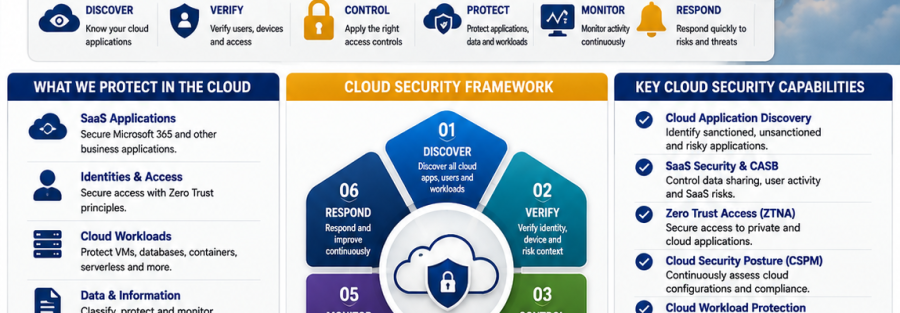
Microsoft Defender for Cloud is designed as a cloud-native application protection platform combining security-posture management and workload protection, including support for multicloud environments.
The question organisations should therefore ask is:
Do we know what cloud services we use, who accesses them, and whether they are configured securely?
1. Discover the Cloud Applications Your Employees Are Using
An organisation may approve Microsoft 365 and several business platforms.
But employees sometimes begin using additional applications without formal approval.
Examples can include:
- File-sharing services
- Online PDF tools
- Project-management platforms
- Personal cloud storage
- Messaging applications
- AI services
- Free collaboration applications
This is commonly associated with Shadow IT.
The organisation cannot effectively protect applications it does not know are being used.
Microsoft Defender for Cloud Apps provides cloud-application visibility and SaaS security capabilities, while Cisco Secure Access includes CASB capabilities for cloud-app discovery, risk scoring and policy control.
A cloud-security assessment should therefore answer:
Which applications are employees using?
Which applications are approved?
Which applications contain business information?
Which applications present unacceptable risk?
2. Protect Microsoft 365 as a Cloud Environment
Microsoft 365 contains far more than email.
Depending on the organisation’s subscriptions, it may contain:
- Exchange Online
- Microsoft Teams
- SharePoint
- OneDrive
- User identities
- Business documents
- Calendars
- Customer communications
- Internal collaboration
- Administrative settings
Microsoft Defender for Cloud Apps integrates with supported Microsoft 365 services and can provide SaaS security posture management and additional monitoring and protection capabilities.
Organisations should review areas including:
- Administrator privileges
- External sharing
- Guest accounts
- Suspicious sign-ins
- Application permissions
- Data-sharing activity
- Third-party integrations
- Security configuration
- User behaviour
Cloud security begins with configuration—not simply purchasing a licence.
3. Control Access According to User and Device Risk
A cloud application should not grant access only because somebody enters the correct password.
Modern access policies can consider:
- User identity
- Authentication strength
- Device security
- Location
- Application requested
- User privilege
- Risk level
This continues the Zero Trust approach we have covered in our recent campaign.
Cisco Secure Access is built around cloud-delivered, Zero Trust access from users and devices to applications and supports granular ZTNA policies for private applications.
The objective is:
Right user + trusted device + approved application + appropriate access
4. Protect SaaS Applications
SaaS applications can contain valuable organisational information.
Examples include:
- Customer databases
- Financial information
- HR records
- Business documents
- Project information
- Sales data
- Communications
SaaS security should therefore include:
- Discovering applications
- Reviewing configuration
- Controlling user access
- Monitoring unusual activities
- Protecting sensitive information
- Reviewing connected third-party applications
Microsoft describes Defender for Cloud Apps as a SaaS security solution providing CASB functionality, SaaS Security Posture Management, threat protection and app-to-app protection.
5. Protect Cloud Workloads
Cloud security also extends beyond SaaS.
Organisations may operate:
- Virtual machines
- Databases
- Containers
- Web applications
- APIs
- Storage
- Serverless applications
- Development environments
Microsoft Defender for Cloud provides workload protection covering environments including virtual machines, containers, databases and serverless resources.
Palo Alto Networks Prisma Cloud similarly provides cloud-native application protection across infrastructure, workloads and applications in public, private, hybrid and multicloud environments.
The correct controls depend on the workload rather than assuming every cloud resource requires the same configuration.
6. Continuously Check Cloud Security Configuration
Cloud environments change quickly.
A new service may be deployed.
A security setting may be changed.
A storage resource may become publicly accessible.
An unnecessary administrator may be created.
A development workload may move into production.
This is why Cloud Security Posture Management — CSPM has become important.
Microsoft describes CSPM as a core capability of Defender for Cloud that evaluates cloud resources and provides recommendations for improving security posture.
CSPM can help organisations move from:
“We configured it securely when we deployed it.”
to:
“We continuously check whether it remains secure.”
7. Protect Web Applications and APIs
Customer-facing and internal web applications may expose another attack surface.
Potential concerns include:
- Vulnerable APIs
- Misconfigured services
- Unprotected applications
- Excessive permissions
- Malicious web requests
- Application-layer attacks
Palo Alto Networks Prisma Cloud provides integrated web-application and API security capabilities as part of its cloud-native application protection platform.
Cloud-security planning should therefore include both:
Infrastructure security
and
Application security.
8. Control Internet and SaaS Access for Remote Users
Employees increasingly work outside the traditional office.
Their internet traffic may therefore never pass through the headquarters firewall.
Cloud-delivered security can help apply organisational policies wherever authorised employees work.
Cisco Secure Access is a cloud-delivered Security Service Edge platform incorporating technologies such as secure web access, ZTNA, CASB, DLP, firewall-as-a-service and DNS-layer security.
This can help organisations protect:
- Office users
- Remote employees
- Branches
- Travelling staff
- Contractors
- Mobile workers
Security should follow the user and application, not depend only on the employee’s physical location.
9. Watch for Shadow AI
AI applications create another cloud-security question.
Employees may use AI tools for:
- Writing
- Analysis
- Research
- Coding
- Summarisation
- Document processing
The organisation should understand:
- Which AI applications employees use
- Whether they are approved
- What information is being uploaded
- Whether sensitive data policies apply
Cisco’s current Secure Access material specifically highlights visibility into shadow IT and shadow AI as organisations increasingly adopt cloud and AI applications.
This connects directly with our 14 August Data Loss Prevention campaign.
Cloud security and data protection should work together.
10. Monitor Cloud Activity
Cloud security is not a one-time configuration exercise.
Organisations should monitor for:
- Suspicious logins
- Unusual downloads
- New administrators
- Unexpected application connections
- Risky SaaS usage
- Policy changes
- Security misconfigurations
- Unusual user activity
- Cloud workload threats
Microsoft Defender for Cloud Apps can integrate cloud-app activity with Microsoft security operations, including Microsoft Sentinel or other supported SIEM solutions.
The important question is not simply:
“Do we receive alerts?”
It is:
“Who reviews them, investigates them and responds?”
Cloud Security Technologies Junubia Host Can Help Assess
Microsoft Security
Relevant Microsoft technologies can include:
- Microsoft Defender for Cloud
- Defender CSPM
- Cloud workload protection
- Microsoft Defender for Cloud Apps
- Microsoft Entra security
- Microsoft Purview
Microsoft Defender for Cloud supports posture management and workload protection across cloud environments, while Defender for Cloud Apps focuses on SaaS visibility, control and threat protection.
Cisco
Cisco Secure Access provides cloud-delivered controls including:
- Zero Trust Network Access
- Secure internet access
- CASB
- DLP
- DNS security
- Firewall-as-a-Service
- SaaS protection
Palo Alto Networks
Palo Alto Networks Prisma Cloud provides cloud-native application protection covering:
- Cloud security posture
- Workloads
- Applications
- Containers
- Serverless resources
- APIs
- Cloud data
Junubia Host Cloud Security Process
1. Discover
Identify cloud platforms, SaaS applications, users and workloads.
2. Assess
Review identities, configurations, data, workloads and access.
3. Prioritise
Identify critical applications and high-risk gaps.
4. Secure Access
Apply appropriate identity, device and application-access controls.
5. Strengthen Configuration
Improve cloud-security posture and remove unnecessary exposure.
6. Protect Workloads
Apply appropriate workload and application protection.
7. Monitor
Track threats, configuration changes and unusual behaviour.
8. Improve
Continuously adjust controls as cloud usage evolves.
Cloud Security Readiness Checklist
Ask your IT team:
- Do we know every SaaS application employees use?
- Which cloud applications contain sensitive information?
- Are administrator accounts properly protected?
- Is external sharing controlled?
- Are cloud configurations reviewed continuously?
- Can employees use unapproved cloud applications?
- Can we identify Shadow IT?
- Do we know which AI applications employees are using?
- Are cloud workloads monitored for threats?
- Are web applications and APIs appropriately protected?
- Can remote users securely access approved applications?
- Who reviews cloud-security alerts?
If several answers are unclear, the organisation may benefit from a Cloud & SaaS Security Assessment.
Conclusion
Moving to the cloud does not transfer all cybersecurity responsibility to the cloud provider.
Organisations still need to protect:
Identities → Devices → Access → Applications → Data → Workloads
Cloud security requires visibility, secure configuration, least-privilege access, workload protection and continuous monitoring.
Junubia Host helps Tanzanian organisations assess cloud and SaaS security requirements using appropriate technologies from Microsoft Security, Cisco and Palo Alto Networks.