Your Security Tools Are Generating Alerts. Who Is Connecting the Dots?
Imagine this sequence.
At 9:03 AM, an employee receives a phishing email.
At 9:07 AM, their Microsoft 365 credentials are used from an unusual location.
At 9:10 AM, suspicious activity begins on their laptop.
At 9:14 AM, that device attempts to connect to another business system.
At 9:18 AM, a large amount of information begins moving toward an unfamiliar destination.
Each event may generate a separate security alert.
But the real question is:
Does your organisation understand that all five alerts may represent one attack?
This is one of the problems modern XDR and security-operations platforms are designed to solve.
Microsoft Defender XDR combines signals from products including Defender for Endpoint, Defender for Office 365, Defender for Identity and Defender for Cloud Apps and can group related alerts, affected assets and response information into incidents.
Cisco XDR likewise correlates security information across network, endpoint, email, cloud and identity to help analysts prioritise incidents and take response actions.
What Is XDR?
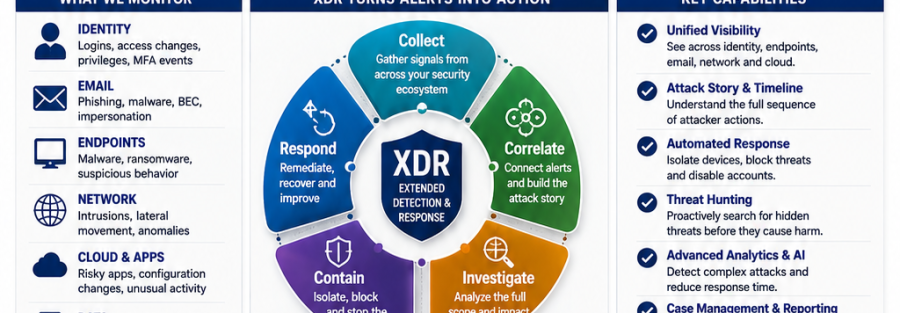
XDR means Extended Detection and Response.
It connects security telemetry from multiple security areas so suspicious activity can be analysed as part of a wider attack.
Instead of investigating:
Email alert
then separately:
Endpoint alert
then separately:
Identity alert
then separately:
Network alert
XDR attempts to connect them into:
One attack story
This helps answer:
- Where did the attack begin?
- Which user is affected?
- Which devices are involved?
- Which applications were accessed?
- Did the attacker move laterally?
- Was information exposed?
- Which response should happen first?
Cisco describes XDR as correlating data from different security technologies and using analytics and intelligence to prioritise threats and recommend responses.
1. Collect Security Signals from Across the Organisation
Cybersecurity visibility should extend beyond one product.
Important signals may come from:
Identity
- Unusual sign-ins
- Failed authentication
- New administrator privileges
- Suspicious MFA activity
- Compromised credentials
- Phishing
- Malicious attachments
- Dangerous links
- Impersonation
- Business email compromise
Endpoints
- Malware
- Ransomware
- Suspicious processes
- Credential theft
- Unusual scripts
Networks
- Unexpected connections
- Lateral movement
- Intrusion attempts
- Unusual traffic
Cloud
- Risky applications
- Configuration changes
- Suspicious downloads
- Workload threats
Data
- Unusual file access
- High-risk transfers
- DLP alerts
Security operations should combine these perspectives whenever possible.
Microsoft’s unified security-operations model brings Defender XDR and Microsoft Sentinel together in the Microsoft Defender portal, allowing organisations to investigate threats using Defender data and broader SIEM information from additional data sources.
2. Turn Many Alerts into Prioritised Incidents
More alerts do not automatically mean better security.
Imagine your security team receives:
1,000 alerts.
Which should they investigate first?
A useful security-operations platform should help identify:
- Which alerts are related
- Which assets are affected
- Which user is involved
- How serious the attack appears
- Whether the attack is still active
- Which containment action may be required
Microsoft Defender XDR provides a combined incidents queue intended to group related alerts, impacted assets and automated remediation information.
Cisco XDR also focuses on prioritised incident workflows to help security teams move from investigation toward containment and remediation.
The goal is:
Prioritise what matters—not simply count alerts.
3. Reconstruct the Attack Timeline
Security analysts need context.
Suppose an endpoint alert shows a suspicious PowerShell command.
That alert becomes more useful when the analyst can see:
8:52 — phishing email received
8:55 — malicious link clicked
8:57 — unusual authentication
9:02 — suspicious process launched
9:06 — connection to another endpoint
9:11 — confidential information accessed
Now the security team sees an attack sequence, not just a technical event.
Cisco’s current XDR platform includes attack-story and forensic capabilities intended to provide analysts with more context around security incidents. Its July 2026 release expanded AI-driven incident analysis and attack-story functionality.
4. Investigate the Full Scope
A security team should determine:
- Which user was initially compromised?
- How did the attacker gain access?
- Which endpoints were involved?
- Which systems were contacted?
- Were administrator privileges obtained?
- Did the attacker access email?
- Was information downloaded?
- Were security settings changed?
- Are additional accounts affected?
Microsoft Defender XDR is specifically designed to connect signals from different Defender services so analysts can understand the full scope and impact of an attack.
A good investigation should therefore move from:
“We found malware on one laptop.”
to:
“We understand what happened before, during and after the endpoint compromise.”
5. Contain the Threat Quickly
Investigation is important.
But while the security team investigates, the attacker may still be operating.
Response capabilities can include actions such as:
- Isolating an affected endpoint
- Disabling a compromised account
- Blocking malicious files
- Restricting access
- Removing malicious email
- Preventing further lateral movement
Microsoft Defender XDR includes automatic attack-disruption and remediation capabilities in supported configurations, allowing high-confidence signals across security workloads to trigger containment actions.
Cisco XDR also supports containment and response workflows designed to stop critical threats and lateral movement.
Automation must still be implemented carefully according to business risk and organisational approval.
6. Use SIEM for Broader Visibility
XDR and SIEM are related but not identical.
XDR
Typically focuses on correlating security telemetry across security products and responding to attacks.
SIEM
Collects and analyses logs and security information from a broader range of systems.
These may include:
- Security products
- Servers
- Firewalls
- Applications
- Cloud platforms
- Operating systems
- Business systems
- Identity platforms
Microsoft Sentinel is Microsoft’s cloud-native SIEM platform and can integrate with Defender XDR in Microsoft’s unified security-operations environment. Defender incidents and advanced hunting events can be synchronised into Sentinel for broader analysis and longer-term data retention according to configuration.
For some organisations, combining SIEM and XDR can provide a wider operational picture.
7. Threat Hunting Should Not Wait for an Alert
Sometimes security teams need to ask questions proactively.
For example:
Have any users signed in from this suspicious IP address?
Did any other endpoints execute this file?
Has this unusual command appeared anywhere else?
Are there signs that the attacker existed before the alert?
This is called threat hunting.
Microsoft Defender XDR provides cross-product hunting capabilities across security telemetry, while Cisco XDR provides investigation and forensic capabilities across integrated security information.
Threat hunting changes security from:
Wait → Receive Alert → Respond
to:
Search → Investigate → Find Hidden Risk
8. Automation Can Help Reduce Response Time
Security teams frequently perform repetitive tasks:
- Gathering information
- Checking users
- Looking up devices
- Blocking indicators
- Opening investigations
- Updating cases
- Notifying teams
Automation can perform parts of these workflows.
Palo Alto Networks’ current Cortex XSIAM platform continues to expand automation and AI-assisted security operations. Its July 2026 update added further agentic capabilities designed to automate workflows and support faster detection and remediation.
Cisco XDR also provides guided automation and AI-assisted prioritisation for investigation and response.
Automation should improve analysts’ speed—not remove human accountability for important business decisions.
9. Build a Clear Incident-Response Process
Technology alone cannot manage an incident.
Someone must know:
Who receives the alert?
Who determines severity?
Who isolates a system?
Who informs management?
Who contacts affected users?
Who preserves evidence?
Who restores operations?
Who documents what happened?
NIST’s current incident-response guidance treats incident response as part of the full cybersecurity-risk-management lifecycle rather than a separate activity that begins only after an attack. Detect, Respond and Recover are closely connected with preparation activities under Govern, Identify and Protect.
A practical incident-response structure may include:
Detect → Triage → Investigate → Contain → Eradicate → Recover → Improve
10. Define Incident Severity
Not every alert should receive the same response.
An organisation can define categories such as:
Low
Suspicious activity with limited evidence of compromise.
Medium
Confirmed security issue with limited business impact.
High
Confirmed compromise involving critical systems or important users.
Critical
Active attack affecting essential operations, sensitive information or multiple systems.
Severity can determine:
- Who receives notification
- Response priority
- Management involvement
- External escalation
- Business-continuity actions
Without clear severity rules, technical teams may either overreact to minor events or underestimate serious attacks.
11. Preserve Evidence
During a security incident, organisations may need:
- Endpoint telemetry
- Authentication logs
- Email information
- Network logs
- Cloud activity
- Security alerts
- File information
- Administrator actions
Evidence can help determine:
- How the attack occurred
- How long the attacker was present
- What systems were affected
- Whether information was exposed
- Which weaknesses require correction
This is one reason appropriate log collection and retention are important parts of a security-monitoring strategy.
Microsoft’s Sentinel guidance specifically includes planning for interactive and longer-term data retention according to organisational requirements.
12. Learn from Every Incident
Incident response should not end when the affected laptop is repaired.
Ask:
Why did the attack succeed?
Which control failed?
Which alert arrived first?
Could we have detected it earlier?
Was the response fast enough?
Do policies need to change?
Do employees require training?
Should monitoring be improved?
NIST’s latest incident-response guidance emphasises continuous improvement and feeding lessons learned back into cybersecurity-risk-management activities.
Each incident should make the next incident harder for an attacker.
Technology Junubia Host Can Help Assess
Junubia Host’s published cybersecurity services already cover assessments, security architecture, endpoint protection, monitoring, reporting and ongoing security improvement, and its portfolio includes Microsoft, Cisco and Palo Alto Networks technologies.
Microsoft Security
Relevant technologies can include:
- Microsoft Defender XDR
- Microsoft Sentinel
- Defender for Endpoint
- Defender for Office 365
- Defender for Identity
- Defender for Cloud Apps
- Defender for Cloud
Microsoft now brings Defender XDR and Microsoft Sentinel together in the Microsoft Defender portal as part of its unified security-operations approach.
Cisco XDR
Cisco XDR connects security information across areas including:
- Networks
- Endpoints
- Cloud
- Identity
It provides investigation, prioritisation, automation and response capabilities.
Palo Alto Networks Cortex
Relevant security-operations capabilities can include:
- Cortex XDR
- Cortex XSIAM
- Security analytics
- Automation
- Incident investigation
- Response
Palo Alto Networks continues to expand Cortex XSIAM toward increasingly automated security operations.
Junubia Host Security Operations Process
1. Discover
Identify security tools, data sources, applications, users and critical systems.
2. Connect
Determine which security signals should be centrally monitored.
3. Prioritise
Define critical users, systems, incident severity and escalation requirements.
4. Detect
Configure appropriate alerts, analytics and correlation.
5. Investigate
Understand the complete attack story rather than individual alerts.
6. Contain
Define safe and authorised containment procedures.
7. Respond
Coordinate technical, management and business actions.
8. Recover
Restore affected users and systems safely.
9. Improve
Use every incident to strengthen policies, monitoring and security architecture.
Security Monitoring Readiness Checklist
Ask your organisation:
- Who receives cybersecurity alerts?
- Are endpoint, email and identity alerts investigated together?
- Can we identify which alerts belong to the same attack?
- Can we reconstruct an attack timeline?
- Do we monitor cloud and network security events?
- Can we isolate compromised endpoints?
- Can we disable compromised identities quickly?
- Do we have defined incident-severity levels?
- Who informs management during a major incident?
- Are security logs retained long enough for investigation?
- Can we search historical activity?
- Do we regularly review lessons learned?
If several answers are unclear, your organisation may benefit from a Security Monitoring, XDR & Incident Response Assessment.