
Microfinance institutions in East Africa handle savings, loans and mobile money for thousands of customers, often with a small IT team spread across many branches. Updates for Windows, servers, firewalls and applications arrive every month. When they are postponed again and again, the organisation keeps running with security holes that attackers already know how to use, even though a fix has been published.
Patch management is the routine of finding, testing and installing those fixes on a regular schedule. It is not complicated, but it must be planned.
Why Patching Gets Skipped
- Fear that an update will break the core banking system
- Branch computers that are rarely switched on after hours
- Slow links that make large downloads difficult
- No list of what devices exist, so some are forgotten
- Firewalls and switches that “just work” and are never touched
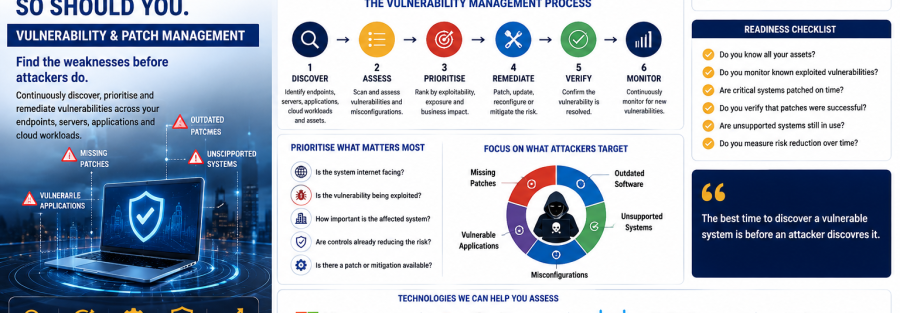
A Simple Patch Routine
1. Know what you have
Keep an inventory of every computer, server, firewall, switch and important application, with its version. You cannot update what you do not know exists.
2. Rank by risk
Internet-facing systems such as firewalls, VPN gateways, email and web servers come first, because they are the easiest for attackers to reach. Critical updates that vendors flag as actively exploited should be installed as soon as possible.
3. Test on a small group
Install updates first on a few computers in head office and on a test server if you have one. Check that the core banking client, printers and finance tools still work, then roll out to everyone.
4. Use a fixed maintenance window
Agree a monthly window, for example the weekend after Microsoft’s monthly security release, when servers can restart. Staff then know when to expect it, and nothing restarts during business hours.
5. Automate where possible
Tools such as Microsoft Intune or Windows Update for Business can push updates to laptops automatically, even when they are in a branch. This removes the need to visit each machine.
6. Report what is still missing
Each month, list devices that did not update and follow up. A short report to management keeps patching visible.
Do Not Forget Network Devices
Firewalls, VPN gateways and switches need firmware updates too, and they are frequent targets. Check vendor advisories for Fortinet, Sangfor, Cisco or whichever brands you run, and keep the firewall’s security subscriptions active so its threat protection stays current.
Old Systems That Cannot Be Patched
Operating systems and devices that no longer receive updates should be replaced. If that is not possible straight away, isolate them on a separate network, limit who can reach them and plan their replacement in next year’s budget.
Quick Checklist
- Complete device and software inventory
- Internet-facing systems patched first
- Test group before full roll-out
- Monthly maintenance window agreed
- Automated updates for laptops
- Firewall firmware and subscriptions current
- Monthly report of missing updates
How Junubia Host Can Help
Junubia Host helps microfinance institutions set up patch routines with Microsoft Intune, keeps Fortinet and Sangfor firewalls up to date, and can monitor your servers with Nagios. See our cybersecurity solutions.
Find Your Missing Updates
Book a free IT assessment and we will show you which systems are behind on updates. WhatsApp: +255 768 404 666 (Tanzania and Rwanda) or +211 924 786 666 (South Sudan).
Written by Dut Majak, CEO and Founder of Junubia Host Co Ltd. Dut leads Junubia’s work with banks, government institutions, NGOs and businesses across South Sudan, Tanzania and Rwanda.